


Case Status
4.91.72K Reviews
App Specs
- Version
- 2.6.38
- Updated On
- License
- Free
- Downloads
- 500,000+
- Developer
- Case Status, Inc
- Categories
- Communication
- Platform
- Android
Screenshots
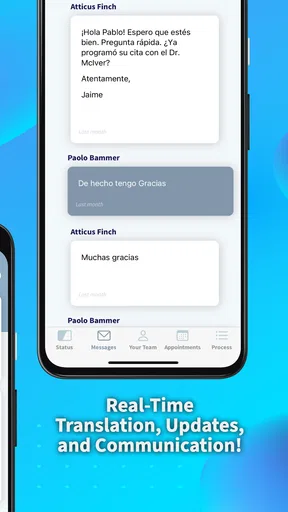
 Analysis by AppCompare
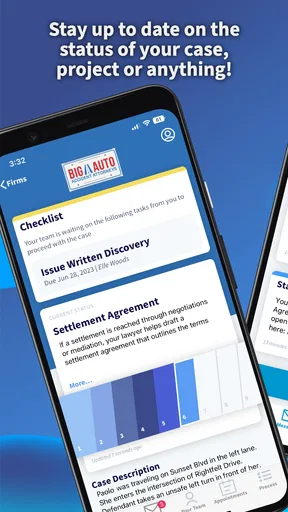
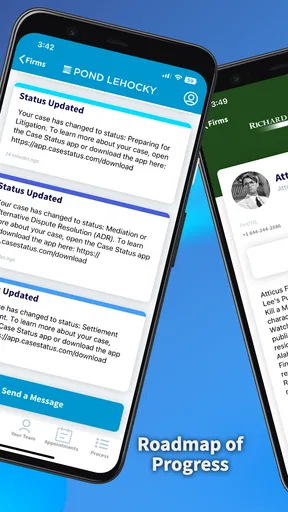
Keeping track of a legal case can be stressful even when nothing unusual is happening. The difficult part is often the waiting: you may need to know whether something has changed, but calling an office repeatedly is not always practical. Case Status, from Case Status, Inc, is a free communication app built around that narrow need. I found its value less in doing anything dramatic and more in giving case-related updates a place that is easier to check than scattered messages, notes, or memory.
The app is aimed at people who already have a legal case and want to stay informed about its status. That sounds simple, but the usefulness depends heavily on getting the initial setup right and understanding what the app can realistically tell you. It is not a replacement for a lawyer, legal advice, official documents, or urgent contact with a case office. Used with those boundaries in mind, it can be a convenient companion for routine status checking.
Getting past the first points of friction
My first practical recommendation is to treat setup as part of the process rather than rushing through it. A case-status app is only helpful when it is connected to the correct case information. Before entering anything, I would have the relevant paperwork nearby and compare names, reference details, and other identifying information carefully. A single mistyped character can make an otherwise healthy app appear unhelpful.
This is one of the places where users may get stuck and assume the application is broken. If a case does not appear, the problem may be an incorrect entry, a mismatch in the information supplied by the legal office, or a case that has not yet been made available through the service. The sensible response is to recheck the original documents instead of repeatedly submitting guesses.
Case Status is available for everyone in its content rating, and it runs on Android devices using version 6.0 or later. That broad compatibility is useful for people who keep an older phone, although an older operating system can still introduce its own issues. If the app behaves strangely, I would first make sure the phone itself is updated as far as it reasonably can be and that there is enough free storage for normal app operation.
The current version is 2.6.38, so checking whether the installed copy is current is another sensible early step. I would not begin by deleting the app or changing important case information. First, close it fully, reopen it, and try again with the same verified details. Basic steps sound obvious, but they prevent a temporary loading problem from turning into unnecessary setup changes.
What to check before assuming there is a case problem
A reliable routine helps. I would use a stable internet connection, avoid switching between networks during setup, and wait for each screen to finish loading before tapping again. Repeated taps can create confusion, especially when a connection is slow and the interface does not respond immediately.
Worth Reading Before You Choose

EA SPORTS FC Mobile 26 Is a Bigger Football Game, but It Takes Time

Flipboard Shows What News Apps Must Do Beyond the Feed

Switching to Android Auto Means Rethinking Your Driving Routine

Google Calendar Makes a Crowded Week Easier to Manage

Ludo King Makes the Most of the Minutes Between Plans

Baby Panda World Brings Quick Play to Modern Phones, but Its Game Library Feels Busy
It is also worth checking that the phone's date and time are set correctly. This is a general device check rather than a special requirement of the app, but incorrect system settings can make time-sensitive communication and notifications behave unexpectedly. If other online apps are also struggling, the issue is probably broader than Case Status.
Another useful habit is to keep the information used during setup in one secure place. I would not rely on a screenshot that cuts off part of a reference number, and I would not copy details from an old message without comparing them with the latest paperwork. Legal matters can contain similar names or multiple reference numbers, so careful reading matters more than speed.
The app is free, which removes a major barrier for someone who simply wants to try it. Still, free does not mean that every case can be tracked in every situation. The service is most useful when the relevant case information is supported and entered accurately. If your legal representative has told you that updates must be obtained through a particular office or official portal, that instruction should take priority.
Recovering when updates seem stuck
One realistic scenario is a person waiting for a routine update after speaking with a legal office. They open Case Status several times, see no visible change, and begin to worry that something has gone wrong. My advice would be to separate three questions: is the app opening, is the case information correct, and has an actual update been issued? These are different problems and need different responses.
If the app opens but the status looks unchanged, reopening it once and checking the connection is reasonable. I would then compare the displayed information with the last confirmed communication from the legal office. If both say the same thing, the lack of movement may simply mean that no new status has been posted yet. Refreshing repeatedly cannot create an update that has not been issued.
If the app will not open, I would restart the phone and check for an available app update before attempting more disruptive fixes. Clearing temporary app data can sometimes help with a damaged local session, but I would approach that carefully and avoid removing anything that could be needed for sign-in or case identification. When an app handles information connected to a legal matter, convenience should not come at the cost of losing records or forgetting the details needed to reconnect.
If the case disappears after a device change or reinstall, I would gather the original case information before trying to add it again. This is a good reason not to treat the app as the only place where important details exist. Keep official correspondence and legal documents separately. The app can make checking easier, but it should not become your sole archive.
Notification expectations also deserve a realistic approach. A status application may help you check information, but I would never assume that seeing an update in the app is the same as receiving formal legal notice. Deadlines, hearings, filings, and requests for action should be confirmed through the responsible legal professional or official source. That distinction is one of the most important practical lessons for using any case-tracking tool.
Recognizing when the app is not responsible
Many apparent app failures are actually caused by the surrounding situation. A legal office may not have entered a new event yet. A case may be moving through a process that naturally includes long quiet periods. A reference may have changed, or the information may belong to a related matter rather than the exact case being tracked. In those situations, reinstalling the application will not solve the underlying issue.
I would contact the lawyer, representative, or relevant office when the displayed status conflicts with a document you have received, when a deadline is close, or when you need to know what action to take. Case Status can help you notice information, but it cannot interpret the legal meaning of every entry or tell you what strategy is appropriate.
This is also where the app compares differently with usual alternatives. A phone call gives you the chance to ask a detailed question, but it may take time and depends on office availability. Email creates a written exchange, yet replies can be delayed and the information may remain buried in a long thread. Paper documents are authoritative for many purposes, but they are not convenient for quick checking. A dedicated status app sits between these options: faster to consult than a file folder and less conversational than a call.
That middle position is its strength and its limitation. I like it for routine awareness, especially when I want to check whether anything has changed without interrupting someone. I would choose a direct conversation instead when the situation is urgent, confusing, or personally significant enough that a simple status label is not sufficient.
Who will get the most from it
The best fit is someone who wants a focused way to follow an existing legal matter and is comfortable verifying details during setup. It can be particularly useful for people who dislike keeping track of several email threads or who want a quick place to look before contacting their representative. The free price also makes it easy to test without committing money.
Its audience is reflected in its scale: the app has passed half a million installs, with an average rating of 4.9 from roughly twenty-five thousand ratings. Those figures suggest that many users find the narrow purpose worthwhile, though they should not replace your own judgment. A high rating cannot guarantee that the service will fit every case, device, or communication arrangement.
I would be more cautious about recommending it to someone who expects detailed legal explanations, document management, direct advice, or guaranteed real-time information. Those needs belong elsewhere. Someone who rarely uses mobile apps may also prefer a phone call or help from a trusted person during setup, particularly if the case information is difficult to read or understand.
Privacy and attention are practical considerations too. I would use the app on a device protected with a screen lock and avoid entering case details while connected to an unfamiliar public network. These are sensible habits for any application related to personal legal information. They do not make the app complicated, but they do remind you that convenience should be paired with care.
Small habits that make the workflow safer
I found three habits especially useful. First, keep a separate note of the date when you last checked the case, without copying sensitive information into an insecure place. This helps you distinguish a genuinely new update from a status you simply missed earlier. Second, compare important changes with official communication instead of acting on an isolated screen. Third, decide in advance which situations require a call, such as a deadline or a contradiction between sources.
A fourth habit is to check at sensible intervals rather than constantly reopening the app. Frequent checking can increase anxiety without producing more information. A planned routine gives the tool a clear role: it becomes a way to monitor, not a source of endless uncertainty.
When helping a family member use it, I would also make sure the person understands whose case is being viewed and which information belongs to it. Similar names and related proceedings can create avoidable confusion. The safest workflow is slow verification at the beginning, followed by simple checking once the correct case is visible.
These steps are not flashy features, but they are where much of the real value lies. A status tool works best when it supports an organized process around the case rather than trying to replace that process. The app can reduce friction; it cannot remove the need for accurate records and responsible follow-up.
My practical verdict
After using Case Status as a focused communication utility, I see it as a useful option for people who want a straightforward way to stay aware of a legal case. Its free access, broad Android compatibility, and focused purpose make it approachable. The developer, Case Status, Inc, has kept the concept centered on a specific everyday problem rather than turning it into a general-purpose legal platform.
My main recommendation is to use it as an early-warning and checking tool, not as the final authority on your legal responsibilities. Confirm important developments with the appropriate professional, preserve your original documents, and treat missing updates as something to investigate calmly rather than immediate proof of an app failure.
For routine monitoring, I would recommend Case Status to a friend who already has the correct case information and wants fewer scattered checks. I would skip it, or use it only alongside direct communication, if the matter requires interpretation, urgent action, or formal notice. In that role, it does not need to do everything. It only needs to make ordinary status checking clearer, and for the right user, that is a worthwhile improvement.
Pros
- Quickly check immigration case updates from a mobile device.
- Supports multiple case numbers for convenient tracking.
- Provides status information without visiting a government office.
- Simple interface that is easy for first-time users.
- Useful for monitoring cases while waiting for official notices.
Cons
- Updates may appear later than the official USCIS website.
- Not an official government app
- so information should be verified.
- Some features may require payment or contain advertisements.
- Limited details are available beyond the current case status.
- Requires an internet connection to retrieve the latest updates.
FAQs for Case Status
What is Case Status, and what can I use it for?
Case Status is an app designed to help users check and follow the progress of a legal or immigration case from a mobile device. After entering the required case information, users may be able to view updates, notices, processing details, or status changes in one place. It is mainly a convenience tool for monitoring information, not a replacement for official legal advice or government records.
Is Case Status an official government or court application?
Before downloading, users should verify who publishes Case Status and which organizations its information comes from. Some apps use publicly available data or connect to official case-status systems, while others are independent tracking tools. The app should not automatically be considered an official government or court service. For important deadlines, decisions, or filings, always confirm the information through the relevant official website or authority.
What information do I need to enter to track a case?
The information required depends on the type of case and the service supported by the app. Typically, users may need a case number, receipt number, confirmation code, or another reference identifier. Enter details carefully because a single incorrect character can produce no results or display information for a different record. Avoid entering passwords or unnecessary sensitive data unless the app clearly explains why it is needed.
Does Case Status send notifications when a case changes?
Case Status may offer alerts or reminders for status changes, depending on the version of the app and the type of case being monitored. Notifications can be useful because they reduce the need to check manually, but they should not be treated as guaranteed or immediate. Internet interruptions, delays in source databases, disabled permissions, or changes to the official system may prevent an alert from arriving on time.
Is Case Status safe to use, and should I rely on it for legal decisions?
Users should review the app’s privacy policy, requested permissions, developer information, and data-handling practices before adding case details. Even when the app is useful for convenience, its information may be delayed, incomplete, or dependent on another database. Do not rely on it alone for court appearances, immigration deadlines, payments, or legal decisions. Confirm critical updates directly with the responsible authority or a qualified professional.


